
Obsidian Plugins I’m using
| name | description | authorUrl | comment | |||||
|---|---|---|---|---|---|---|---|---|
| Activity History | Track activity of specified projects, Github like activity board | https://github.com/Darakah/ | rarely used | |||||
| Admonition | Enhanced callouts for Obsidian.md | - | often used | |||||
| Advanced Slides | Create markdown-based presentations in Obsidian | https://github.com/MSzturc | when needed highly useful | |||||
| Advanced Tables | Improved table navigation, formatting, manipulation, and formulas | https://grosinger.net | rarely used | |||||
| Advanced URI | Advanced modes for Obsidian URI | https://github.com/Vinzent03 | rarely used | |||||
| AidenLx’s Folder Note | Add description, summary and more info to folders with folder notes. | https://github.com/aidenlx | rarely used | |||||
| AidenLx’s Folder Note - folderv component | Optional folderv Component for alx-folder-note | https://github.com/aidenlx | rarely used | |||||
| Annotator | This is a sample plugin for Obsidian. It allows you to open and annotate PDF and EPUB files. | https://obsidian.md/about | rarely used | |||||
| Auto Note Mover | Auto Note Mover will automatically move the active notes to their respective folders according to the rules. | https://github.com/farux/ | often used | |||||
| Better Word Count | Counts the words of selected text in the editor. | https://lukeleppan.com | rarely used | |||||
| Book Search | Helps you find books and create notes. | https://github.com/anpigon | often used | |||||
| Buttons | Create Buttons in your Obsidian notes to run commands, open links, and insert templates | https://shbgm.ca | rarely used | |||||
| Calendar | Calendar view of your daily notes | https://github.com/liamcain/ | partially used | |||||
| Canvas Filter | This plugin lets you filter Canvas to only show items of specific color, tags or only connected to currently selected node. | https://ikoshelev.azurewebsites.net/ | rarely used | |||||
| Copy Block Link | Get links to blocks and headings from Obsidian’s right click menu | https://github.com/mgmeyers/obsidian-copy-block-link | partially used | |||||
| Crossbow | Find possible backlinks in your notes. | https://github.com/shoedler | rarely used | |||||
| Custom File Explorer sorting | Allows for manual and automatic, config-driven reordering and sorting of files and folders in File Explorer | https://github.com/SebastianMC | often used | |||||
| Cycle through Panes | Cycle through your open Panes with ctrl + Tab, just like with Tabs in your Browser!, ctrl+shift+Tab for Reverse | https://github.com/phibr0 | rarely used | |||||
| DB Folder | Folder with the capability to store and retrieve data from a folder like database | https://github.com/RafaelGB/obsidian-bd-folder | rarely used | |||||
| Dataview | Complex data views for the data-obsessed. | https://github.com/blacksmithgu | when needed highly useful | |||||
| Dice Roller | Inline dice rolling for Obsidian.md | - | used for random note injection in daily notes | |||||
| Dictionary | This is a simple dictionary for the Obsidian Note-Taking Tool. | https://github.com/phibr0 | rarely used | |||||
| Dynamic Table of Contents | An Obsidian plugin to generate Tables of Contents that stay up to date with your document outline. | - | rarely used | |||||
| Editor Commands Remap | Map hotkeys to editor commands. | https://github.com/c4ctus5 | when needed highly useful | |||||
| Editor Syntax Highlight | Show syntax highlighing in code blocks the editor | https://github.com/deathau | rarely used | |||||
| Emoji Shortcodes | This Plugin enables the use of Markdown Emoji Shortcodes | https://github.com/phibr0 | when needed highly useful | |||||
| Emoji Toolbar | Quickly search for and insert emojis into your notes. | https://github.com/oliveryh/obsidian-emoji-toolbar | rarely used | |||||
| ExcaliBrain | A clean, intuitive and editable graph view for Obsidian | https://zsolt.blog | when needed highly useful | |||||
| Excalidraw | An Obsidian plugin to edit and view Excalidraw drawings | https://zsolt.blog | when needed highly useful | |||||
| Extract Highlights | Create, extract and leverage your markdown highlights | https://publish.obsidian.md/alexisrondeau | rarely used | |||||
| Extract url content | Extract url converting content into markdown | https://github.com/trashhalo | rarely used | |||||
| File Explorer Note Count | The plugin helps you to see the number of notes under each folder within the file explorer. | https://www.ozan.pl | often used | |||||
| Find orphaned files and broken links | Find files that are not linked anywhere and would otherwise be lost in your vault. In other words- files with no backlinks. | https://github.com/Vinzent03 | rarely used | |||||
| Focus Mode | Add Focus Mode to Obsidian. | https://github.com/ryanpcmcquen | often used | |||||
| Folder Note | Click a folder node to show a note describing the folder. | https://github.com/xpgo/obsidian-folder-note | rarely used | |||||
| Folder Note Core | Provide core features and API for folder notes | https://github.com/aidenlx | rarely used (needed by other plugin) | |||||
| Frontmatter Tag Suggest | Autocompletes tags in the frontmatter tags field | https://jmill.dev | often used | |||||
| Garble Text | Garbling text in Obsidian turns all content in the entire app (notes, sidebar, etc) into lines so you can take screenshots without exposing sensitive data. | - | rarely used | |||||
| Hotkeys for templates | Add hotkeys to insert specific templates | https://github.com/Vinzent03 | often used | |||||
| Hover Editor | Transform the Page Preview hover popover into a fully working editor instance | https://github.com/nothingislost | often used | |||||
| Icon Folder | This plugin allows to add an emoji or an icon to a folder or file. | https://florianwoelki.com/ | often used | |||||
| Kanban | Create markdown-backed Kanban boards in Obsidian. | https://github.com/mgmeyers/obsidian-kanban | often used | |||||
| Kindle Highlights | Sync your Kindle book highlights using your Amazon login or uploading your My Clippings file | https://hady.geek.nz | often used | |||||
| Link Nodes In Canvas | A plugin for you to add edges between notes in Canvas based on their links. | https://github.com/Quorafind | rarely used | |||||
| Linter | Enforces consistent markdown styling. | https://github.com/platers | often used | |||||
| Longform | Write novels, screenplays, and other long projects in Obsidian. | https://kevinbarrett.org | rarely used | |||||
| Matter | The official Matter <> Obsidian plugin | https://hq.getmatter.app | often used | |||||
| Maximise Active Pane | Simply fills the workspace with the active pane | - | often used | |||||
| Mind Map | A plugin to preview notes as Markmap mind maps | - | rarely used | |||||
| Minimal Theme Settings | Change the colors, fonts and features of Minimal Theme. | https://www.twitter.com/kepano | used when needed | |||||
| Natural Language Dates | Create date-links based on natural language | https://argentinaos.com/ | used for my daily journal | |||||
| Note Refactor | Extract note content into new notes and split notes | - | rarely used | |||||
| Notion-Like Tables | Your premiere tool for creating and managing tabular data in Obsidian.md | https://github.com/trey-wallis | rarely used | |||||
| Obsidian Git | Backup your vault with Git. | - | often used | |||||
| Omnisearch | A search engine that just works | https://github.com/scambier/obsidian-omnisearch | often used | |||||
| Ozan’s Image in Editor Plugin | View Images, Transclusions, iFrames and PDF Files within the Editor without a necessity to switch to Preview. | https://ozan.pl/aboutme/ | rarely used | |||||
| Page Count | Add the current note’s page length to Obsidian’s status bar. | - | rarely used | |||||
| Periodic Notes | Create/manage your daily, weekly, and monthly notes | https://github.com/liamcain/ | often used | |||||
| Pomodoro Plugin | This is a simple pomodoro plugin for Obsidian. | https://github.com/tokuhirom/ | rarely used | |||||
| Quick Explorer | Perform file explorer operations (and see your current file path) from the title bar, using the mouse or keyboard | https://github.com/pjeby | often used | |||||
| Quick Latex for Obsidian | Speedup latex math typing with auto fraction, align block shortcut, matrix shortcut…etc | https://github.com/joeyuping/quick_latex_obsidian | rarely used | |||||
| Quick Switcher++ | Enhanced Quick Switcher, search open panels, and symbols. | https://github.com/darlal/obsidian-switcher-plus | rarely used | |||||
| Reading Time | Add the current note’s reading time to Obsidian’s status bar. | https://github.com/avr | rarely used | |||||
| Recent Files | List files by most recently opened | https://grosinger.net | often used | |||||
| Simple Embeds | Replaces links, like Twitter and YouTube, with embeds when previewing a file. | https://github.com/samwarnick | rarely used | |||||
| Sliding Panes (Andy’s Mode) | Sliding Panes! Based on the style of Andy Matuschak’s Notes | https://github.com/deathau | often used | |||||
| Smart Connections | Find links to similar notes using artificial intelligence from OpenAI. | https://wfhbrian.com | often used | |||||
| Spaced Repetition | Fight the forgetting curve by reviewing flashcards & entire notes. | https://github.com/st3v3nmw | rarely used | |||||
| Style Settings | Offers controls for adjusting theme, plugin, and snippet CSS variables. | https://github.com/mgmeyers/obsidian-style-settings | rarely used,when needed highly useful | |||||
| Strange new world | Creates a bubble beside each link, thats shows how often this link was referenced. | https://github.com/TfTHacker/obsidian42-strange-new-worlds | often | |||||
| Tag Navigator | Cross-reference navigation through your tags | https://alexanderobenauer.com | rarely used | |||||
| Tag Wrangler | Rename, merge, toggle, and search tags from the tag pane | - | often used | |||||
| Tasks | Task management for Obsidian | https://github.com/obsidian-tasks-group | when needed highly useful | |||||
| Templater | Create and use templates | https://github.com/SilentVoid13 | often used | |||||
| Text Extractor | A (companion) plugin to facilitate the extraction of text from images (OCR) and PDFs. | https://github.com/scambier/obsidian-text-extractor | rarely used | |||||
| Text Generator | Text generation using OpenAI | https://obsidian.md | rarely used, currently I use SmartConnections | |||||
| Tidy Footnotes | Tidy your footnotes seamlessly. | https://github.com/charliecm | when needed highly useful | |||||
| Typewriter Scroll | Typewriter-style scrolling which keeps the view centered in the editor. | https://github.com/deathau | often used | |||||
| Vault Statistics | Status bar item with vault statistics such as number of notes, files, attachments, and links. | - | rarely used | |||||
| Wikilinks to MDLinks | A plugin that converts wikilinks to markdown links and vice versa | https://github.com/agathauy | rarely used,when needed highly useful | |||||
| Zoottelkeeper Plugin | This plugin automatically creates, maintains and tags MOCs for all your folders. | https://github.com/akosbalasko https://github.com/michabrugger | often used |
Some plugins a little more detailed
Advanced Slides - let’s me create presentation with templates directly in Obsidian. I can also present from their and can embed existing content. Really helpful to avoid copying.
Auto Note Mover - helps to get rid of manual moving notes. I combine that with the templater plugin to maintain my Zettelkasten.
Book Search - really cool plugin to immediately fetch book information and link a book directly in my journal and book kanban.
Copy Block Link - allows me to directly link to a block in a note. This way I can jump directly to areas in a note
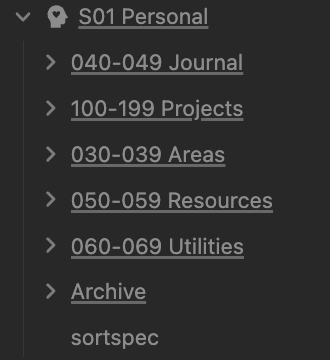
Custom File Explorer sorting - allows me to have my PARA folder structure and Johnny Decimal combined
this shows the folder order of PARA - Projects-Areas-Resources-Archive although the numbering would not allow an alphabetic ordering
Excalidraw - likely you know that already. This is really nice for creating sketches and link from there to notes. Really active development and recently also added further enhancements to work with Pdfs.
Focus Mode - really nice to work on notes with deep focus. I have this also mapped to my Loupedeck
Frontmatter Tag Suggest - just makes working with tags inside front matter much easier
Hotkeys for templates - love this one as this simplifies creating new notes jsut with a hotkey. I have them for literature notes, permanent notes, fleeting notes.
Icon folder - tiny but good. Allows me to add pictures to folders.
Kindle highlights - my main plugin … brings me all the highlights from Kindle directly to Obsidian
Linter - beautiful to add meta information and keep notes in shape
Obsidian Git - just recently switched to do a backup using Git. This makes it really seamless
Omnisearch - helps a lot with finding items
Pomodoro - nice little Pomodoro timer that helps me when I’m in focus mode
Recent Files - really often to just reference the last used files. E.g. when writing my daily journal
Smart Connections - what a super great AI plugin. Brings my notes and leveraging that with AI to the next level
Text Generator is also good, but Smart Connections is more advanced as this also builds on topic of own knowledge.
Spaced Repetition - great for learning. I used that when I really need to memorize something
Strange new world - great for drilling down on a link immediately and finding further associations.
Tidy footnotes - great simplifier when you work with Footnotes
Typewriter scroll - great to have focussed writing mode
Some combinations & usage information-
I use Smart Connections to ask for connection between my notes. Also to create a further summary of it.
I use a combination of Templater, Auto Note Mover and Template Hotkey to create notes of a special type fast and place the note at the right place. In addition I’m using the external LoupeDeck to just press a button and have a new note created. This removes cognitive load when creating notes.